


An MSP maintenance window is a period agreed with a client for changes that may affect devices or services. It should define scope, expected downtime, approval, recovery and the tests required to close the work.
Choosing “Sunday evening” leaves practical questions unanswered. A branch may still be working, a laptop may be offline or an application may need its vendor to validate the change. Resolve those conditions before starting.
Download the Excel maintenance window template. It includes a request with 29 fields, a 10-step execution record and a separate fictional example. No registration is required.
1) Define the change and its impact
Assign a change or ticket ID and describe the expected outcome. “Update devices” is too broad. “Update the approved application on PC-01 through PC-05 and verify a transaction with a user” gives you a scope and a closure test.
Record:
- Client, site, technical owner and operational contact.
- Affected devices, versions, applications and dependencies.
- Exclusions, such as a server requiring a separate intervention.
- Affected users and maximum acceptable downtime.
- Constraints such as active sales, financial close, backups or running jobs.
NIST SP 800-40 Rev. 4 frames patching as preventive maintenance and includes identification, prioritization, installation and verification. Reserve enough time for that complete process.
2) Agree on dates, time zones and communication
Specify start and end dates and times. Include both dates if the window crosses midnight. Record the site's time zone and the UTC offset applicable on that date. “At ten” can mean different times to a technician and a client.
Decide who receives advance notice, who confirms that work can start and whom to contact when the primary contact is unavailable. A recurring policy can authorize standard changes under documented conditions. Changes outside those conditions need a new decision.
Your MSP SLA should explain how scheduled maintenance is treated. Do not assume a window removes availability commitments or authorizes every reboot. Use the MSP–client responsibility matrix to agree on execution and approval ownership.
3) Reserve time to stop and recover
Before execution, document the baseline, a pilot test where appropriate and a recovery path suited to the change. A backup file needs evidence that it can be restored. Some changes cannot simply be uninstalled, so confirm recovery procedures with the vendor.
The Government of Canada's patch management guidance links deployment to change management and contingency and rollback plans. Apply that principle when preparing your own procedure.
For example, if the window ends at 22:00 and recovery requires 20 minutes plus 10 minutes for validation, the latest rollback start is 21:30. Reserve an additional buffer when dependencies or uncertainty require it.
Agree on specific conditions that prevent starting or require stopping:
- Approval for the scope or reboot is missing.
- The backup or recovery procedure has not been verified.
- The pilot fails or a critical dependency is unavailable.
- The agreed time limit is reached.
4) Execute in stages and retain evidence
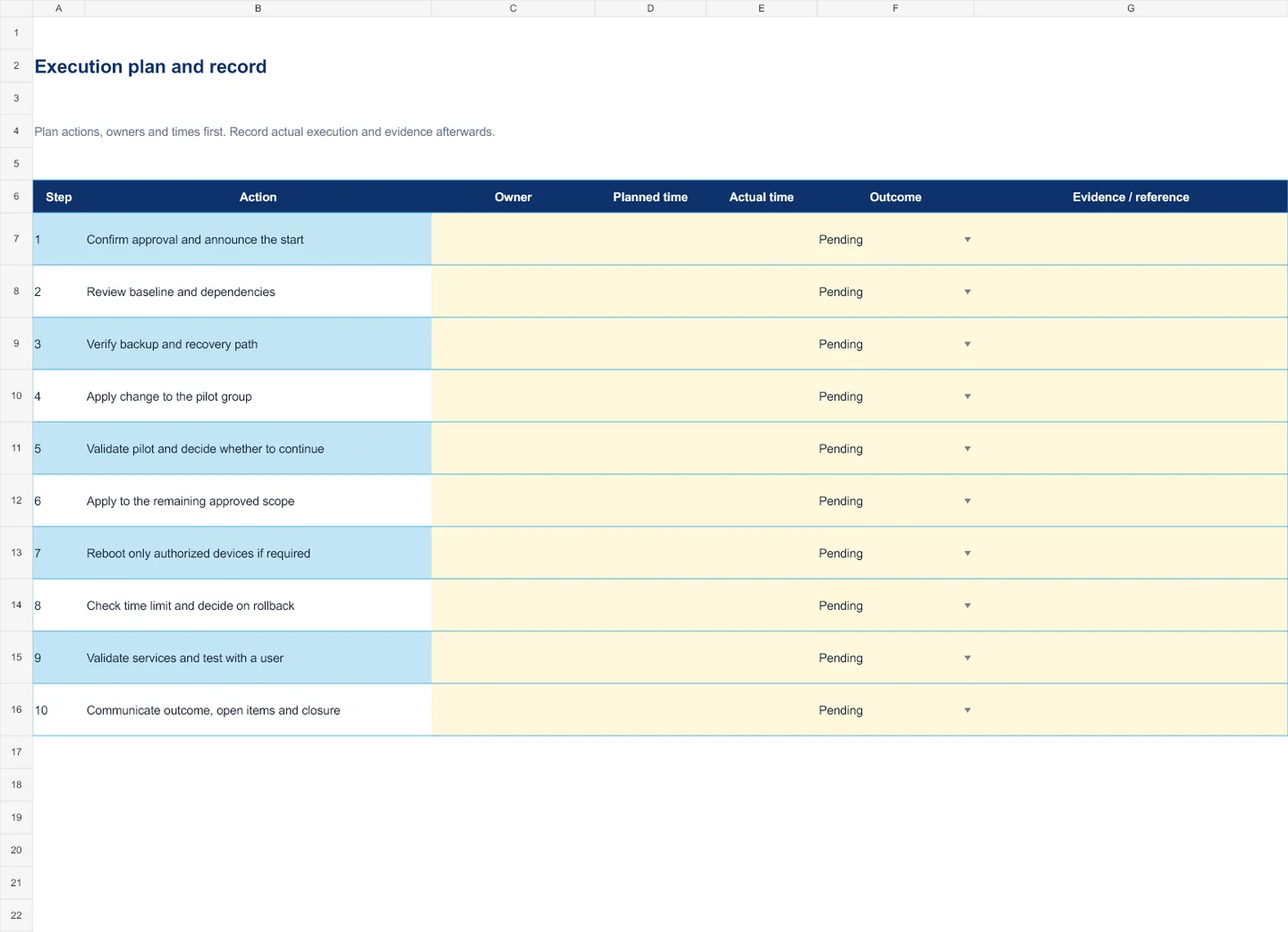
The Execution sheet suggests 10 steps you can adapt. Assign owners and planned times before work starts. During execution, record actual times, outcomes and evidence references. Record a reason for any skipped step.
Start with a representative pilot and review its outcome before expanding. Check authorized reboots and track offline devices, failed installations and work outside the window separately. An offline device remains an open item.
The patch management workflow: detection through verification helps organize technical work. The template retains the agreement and the evidence for that intervention.
5) Close with a service test
Check both the technical result and the function the client uses. An agent can be online and installation can finish while the application still fails to open or a printer cannot print.
Record the resulting version or state, functional test, tester, actual timing and open items with owners and due dates. If you rolled back, document what was recovered and what needs follow-up. Retain client confirmation according to the agreed closure criteria.
Lunixar RMM brings together device context, inventory, monitoring and patch management. Supplement that evidence with service tests and the approval recorded in your change process.
Download and use the template
Download the English XLSX template.
- Save a copy per change and complete the yellow cells on Request.
- Retain client approval and its reference before execution.
- Adapt the 10 Execution steps to the actual procedure.
- Record outcomes, validation and open items before closing.
The Example sheet contains fictional planning data. Approval and recovery remain pending deliberately to show what must be completed before execution. Do not reuse those entries as real client evidence or store passwords or secrets in the file.
Frequently asked questions
How long should a maintenance window last?
It depends on the change, dependencies and recovery. Estimate preparation, execution, reboots, testing and rollback. Agree on the duration with the client using those estimates.
What if a vulnerability needs urgent attention?
Use an emergency change procedure with authorization, impact assessment and validation proportionate to the risk. The next routine window should not be the only response to an urgent exposure.
Can you close with devices still pending?
Record an incomplete outcome or retain explicit open items according to the agreement. Each pending device needs an owner and due date. Do not report the entire fleet as updated without verification.