


Endpoints Windows and Linux in one operating console.
RMM for MSPs and IT service teams
Control every client. See every endpoint.
Lunixar RMM brings monitoring, inventory, patching, alerts, automation, and authorized remote support into one operation—from your first client to a growing service portfolio.
No credit card. Up to 5 devices. Full access for 2 weeks.
Patching Update visibility and operational follow-up.
Authorized access Remote support for managed devices.
Daily priorities
One platform for the work your team handles every day
Start with the operational priority that matters most, then validate how the rest of the workflow stays connected inside Lunixar RMM.
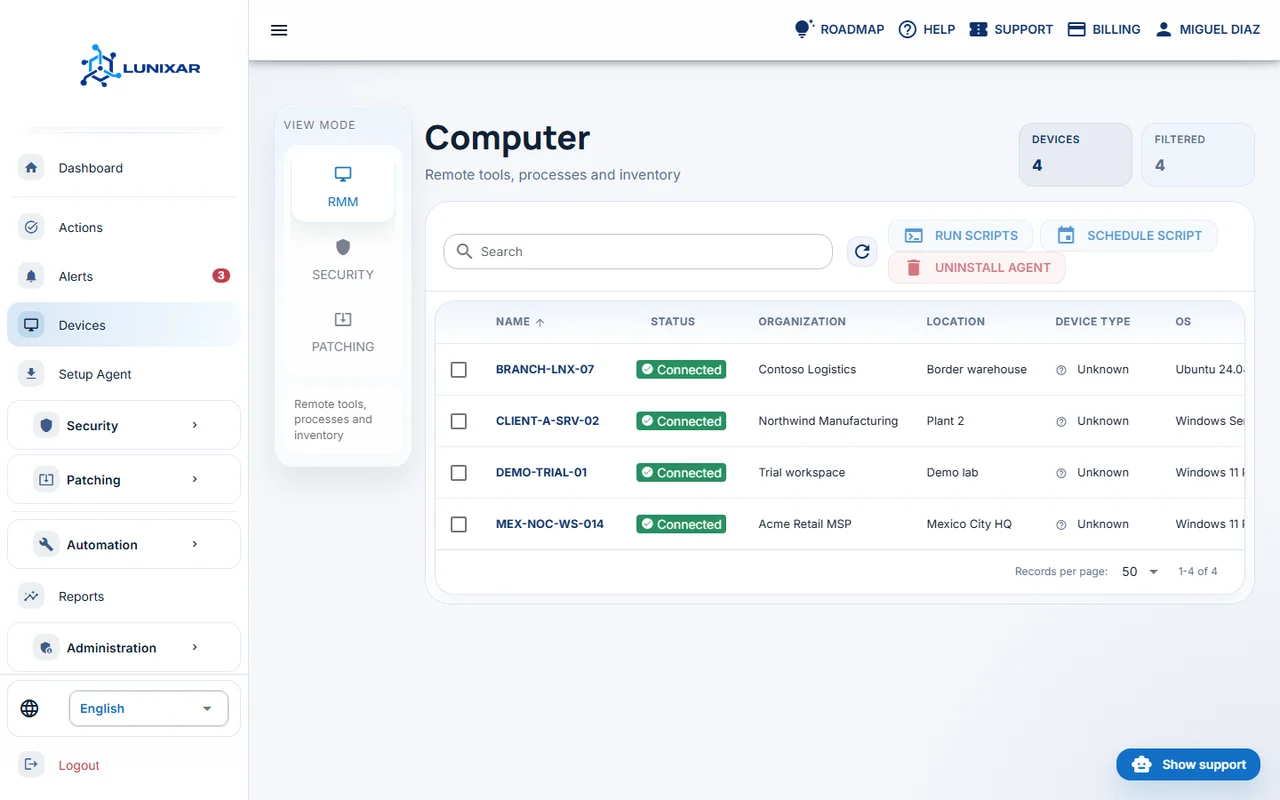
Endpoint visibility
Confirm device inventory, operating context, and endpoint state before technicians start troubleshooting.
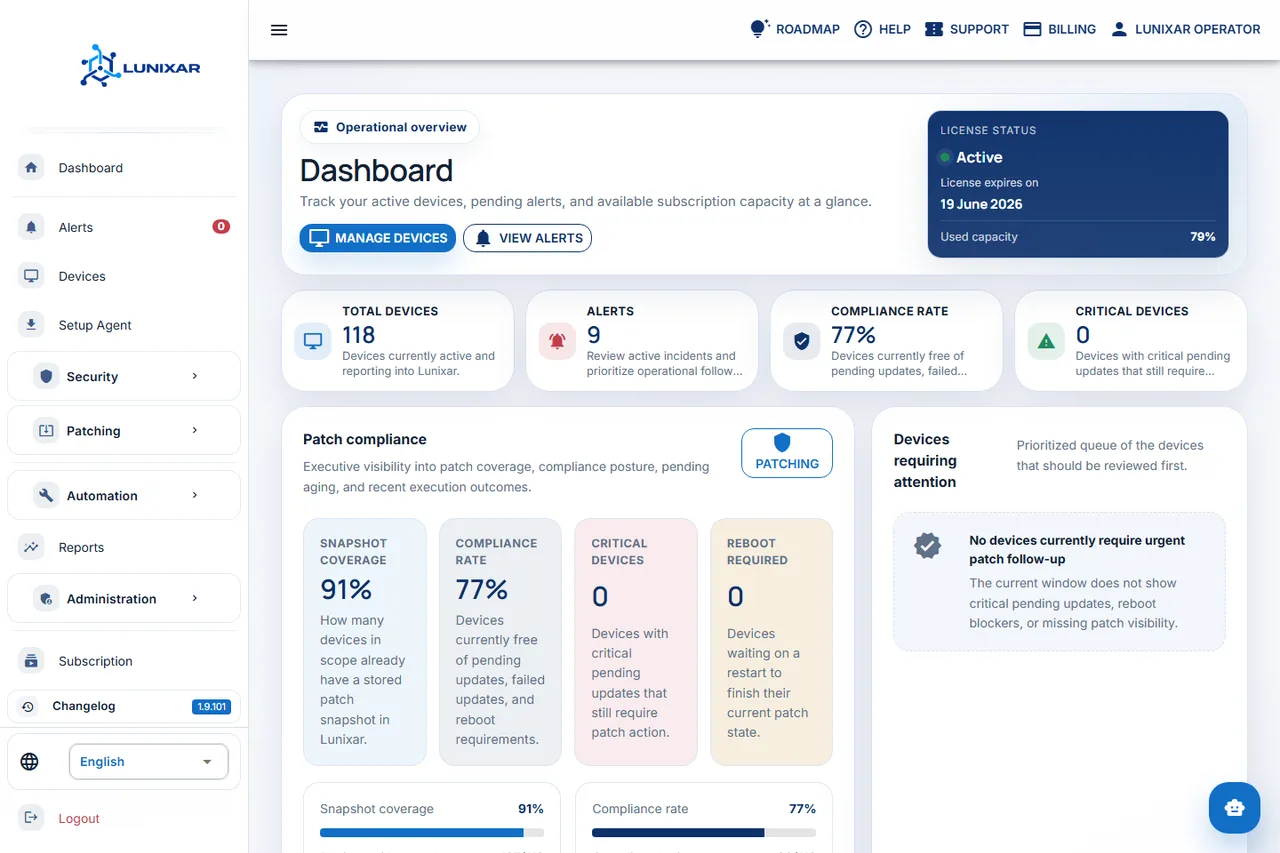
Operational alerts
Review disk, antivirus, security, and endpoint-state signals so response starts from prioritized context.
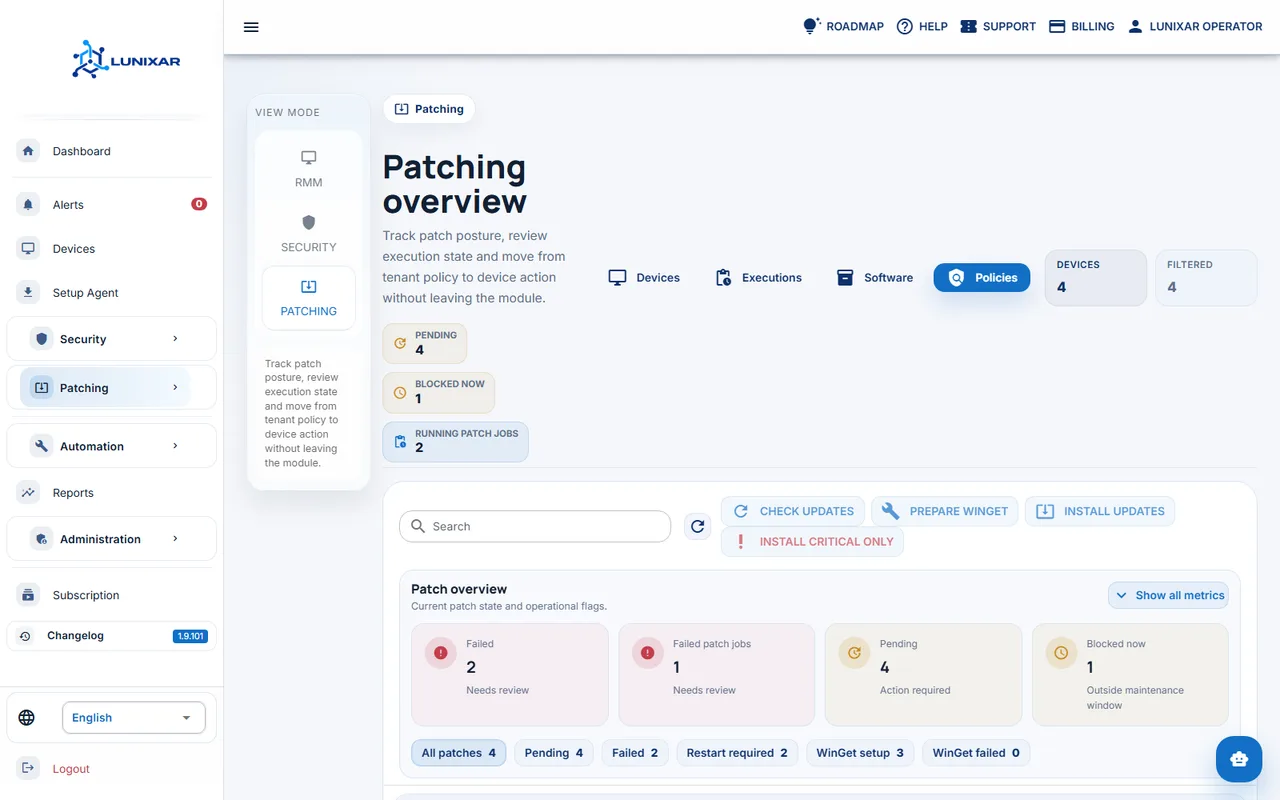
Patching workflow
Check how patch visibility and maintenance follow-up fit into the same RMM operating console.
One connected operation
Everything your team needs to operate with clarity
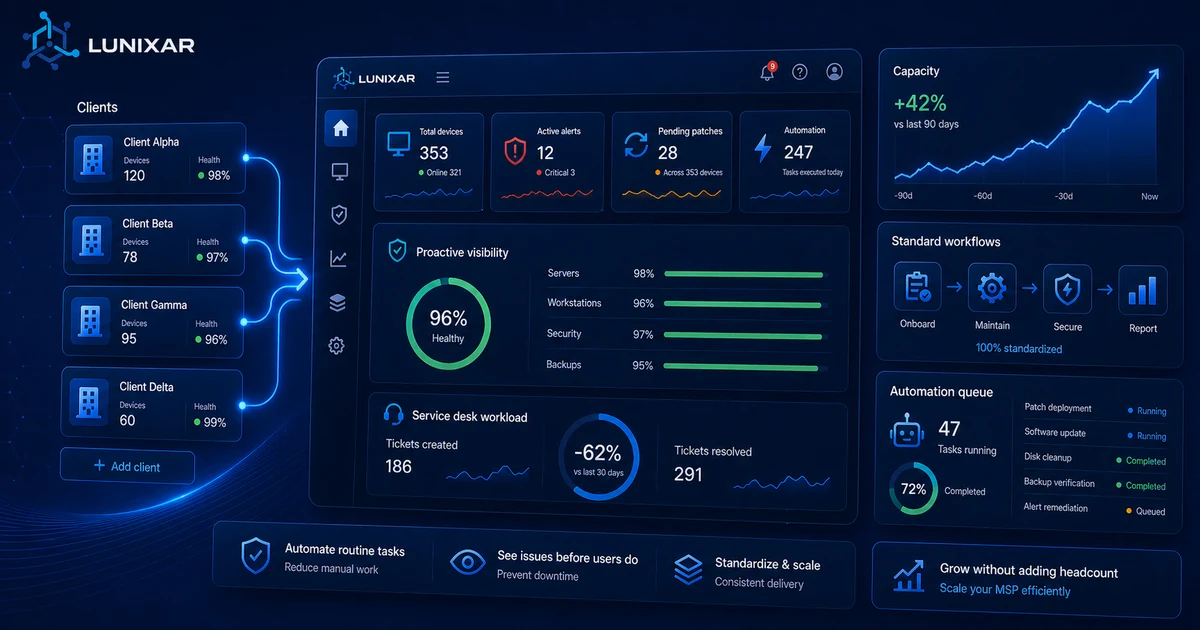
Bring the signals, tools, and endpoint context your technicians need into one console, so a growing client portfolio does not mean fragmented operations.
Endpoint inventory
Hardware, software, and operational context to understand what is installed and what changes on each device.
Operational alerts
Disk, antivirus, security, and endpoint-state signals so technicians can prioritize response.
Patch management
Track Windows, Linux, and application updates inside the maintenance workflow.

Authorized remote access
Remote support for managed endpoints, integrated into the RMM workflow and framed around consent.

Fleet actions
Standardize repeatable work and bulk actions across stable or variable endpoint portfolios.

Operational security
MFA, sessions, audit trails, and platform controls for clearer RMM operating limits.
Advanced capabilities
More context to prioritize, report, and operate with less noise
Beyond the core RMM workflow, Lunixar adds capabilities that turn inventory, patching, security, and support signals into clearer operational decisions.
Vulnerabilities
CVE risk with trusted sources
Correlate software inventory with CVE, CISA KEV, and EPSS data to detect exposure, prioritize findings, and document exceptions as accepted risk or false positives.
Network
Discovery and SNMP context
Identify unmanaged devices around your endpoints, use suggested local IP ranges, and review SNMP v2c snapshots to extend visibility without installing agents everywhere.
Priority

Action Center and tenant health
Bring alerts, offline devices, failed patches, pending reboots, and security posture into prioritized recommendations for daily operations.
Reports

Reports ready to review and export
Review hardware, software, storage, printers, network, sign-ins, patch compliance, security posture, and alerts with CSV, XLSX, or PDF exports.
Support

Tickets and feedback inside the product
Centralize support requests, replies, priorities, statuses, SLA context, and roadmap feedback so the team does not lose operational context.
WinGet
Third-party patching with verification
Prepare devices for WinGet, review readiness, use the application catalog, and verify results after installation to avoid false success states.
Operational workflow
What an organized RMM operation supports
Product screenshots show multi-client operations, monitoring, and patching before you start a trial.
Built to grow with you
From the first installation to an organized multi-client operation
Start with up to 5 devices, validate the daily workflow, then scale with the commercial model that fits your team.
01
Connect up to 5 devices
Use the 2-week trial to validate installation, inventory, alerts, and initial visibility.
02
Test daily work
Review patching, alerts, security, fleet actions, and authorized remote access from the console.
03
Align pricing and growth
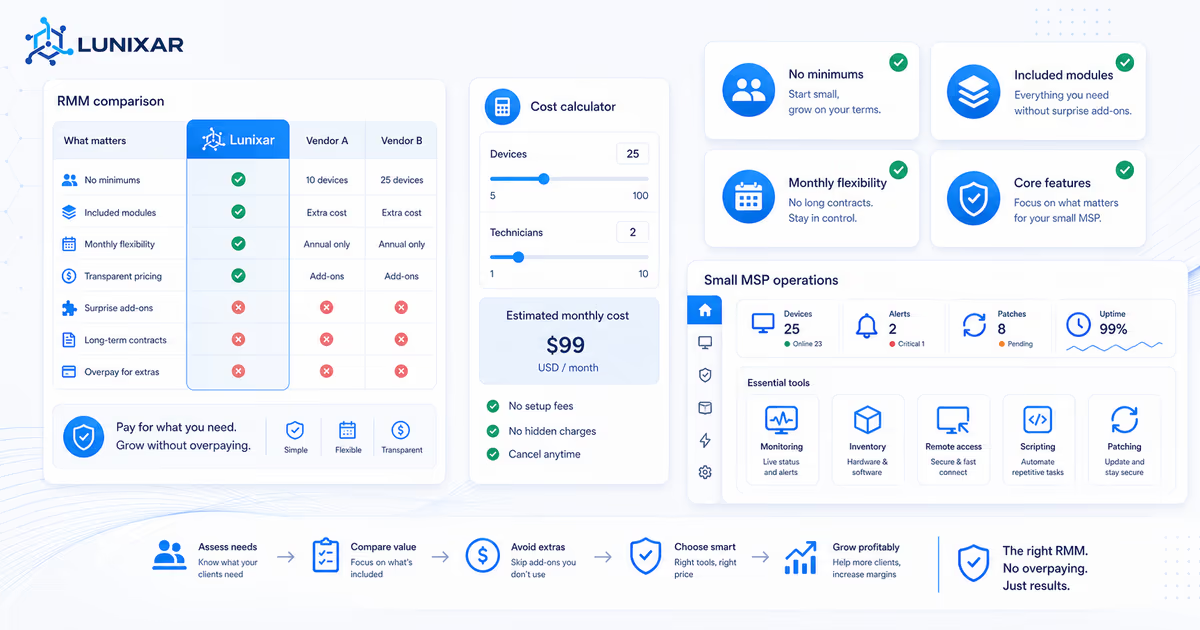
The Professional is the recommended base for serious operations; the Device Plan fits pilots or small fleets.
Transparent RMM pricing
Choose the model that fits how your service operation grows
Professional provides a predictable per-technician base with room to add endpoint packs. The Device Plan keeps a flexible entry point for pilots and smaller fleets.
Professional
USD 79/month
Includes 1 technician, adds 250 endpoints to the tenant shared pool, and provides full access to available RMM capabilities.
Add-on endpoint pack: +100 endpoints for USD 39/month or USD 390/year. Start free trialDevice Plan
USD 0.75/endpoint/month
Useful for pilots and small fleets that prefer paying per endpoint before moving to Professional.
View pricing detailsSecurity and consent
RMM for legitimate support, authorized administration, and operational traceability
Operate with clear authorization boundaries, endpoint visibility, and traceable administrative activity.
- MFA, sessions, and platform controls help reduce compromised-account risk.
- Security alerts and antivirus state with Microsoft Defender actions where applicable.
- Linux security posture in visibility mode: firewall, SSH, sudo admins, and risk signals, without Defender actions.
- Documented RMM abuse prevention, including execution policy, audit trail, and non-renamable installers.
Buying questions
What teams usually need to resolve before trying
Is Lunixar only for small MSPs?
No. Lunixar supports independent technicians, growing MSPs, established service teams, and internal IT departments that manage distributed endpoints. You can start with a few devices and expand capacity through Professional and additional endpoint packs.
Is Lunixar a cheap RMM?
Lunixar is positioned around predictable RMM pricing rather than hidden add-ons. The cheapest RMM headline price is not always the lowest operating cost if remote access, patching, scripting, or alerts are sold separately.
What is included in the free trial?
The trial lets you use Lunixar RMM for 2 weeks, with no credit card, up to 5 devices, and full access to available capabilities.
Who is this landing page for?
MSPs, independent technicians, and internal IT teams that manage distributed endpoints and want to evaluate an RMM quickly.
Which plan should I review first?
For serious operations or variable portfolios, the Professional is usually the starting reference because it includes 250 endpoints added to the shared account pool and can grow with additional 100-endpoint packs.
Does remote access require authorization?
Lunixar messaging focuses on remote support and managed-device administration with authorization inside a clear operating workflow.
Guided trial
Validate Lunixar RMM with your first endpoints
Start with a no-card trial and see how Lunixar fits the real workflow of your service team.
Start free trial